Posts

Docker security scanning
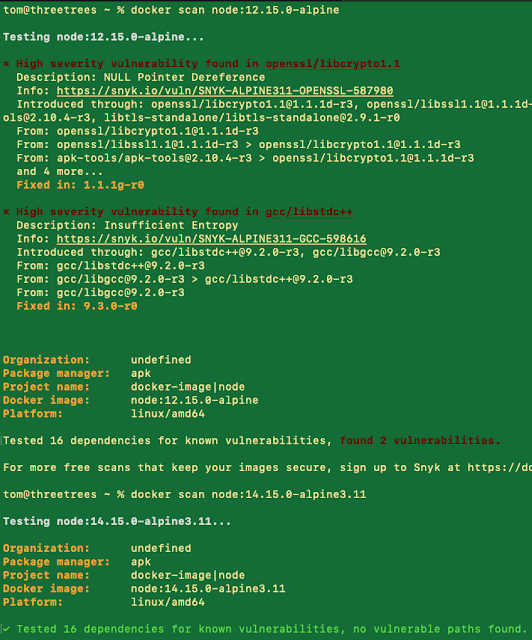
Image
The title pretty much sums it up:  docker scan imagename:tag e.g. docker scan node:12.15.0-alpine is a new command that can be used to scan for container vulnerabilities in Docker Desktop. Here's a blog post:  https://www.docker.com/blog/secure-from-the-start-shift-vulnerability-scanning-left-in-docker-desktop/ . . . and the docs: https://docs.docker.com/engine/scan/ Here are two examples, where node:12.15.0-alpine has vulnerabilities that node:14.15.0-alpine3.11 does not. 

A short guide to clickjacking attacks

I recently read an article from JavaScript Weekly (part of the  Cooper Press  series I subscribe to), and it included a good rundown on clickjacking attacks: https://auth0.com/blog/preventing-clickjacking-attacks/ It's a good article and worth reading.  Here's a summary. What clickjacking attacks are Malicious sites put hidden iframes over a decoy site.  When a user tries to click on something on the decoy site, he or she actually clicks on something in the hidden iframe.  The assumption is that the action taken by the hidden iframe is malicious. How to prevent them Front end There are some workarounds, but these are mostly ineffective. Back end Note: if you're using Node.js and Express, the helmet  library does 1 and 2 by default. If both  X-Frame-Options  and  Content-Security-Policy  are set,  the CSP setting prevails . Set the X-Frame-Options header to SAMEORIGIN (helmet's default) or DENY.  This is a widely-recognized sta...

Never quit

Image
I live 20 minutes from a trail in my city, and I've been intending to hike it for more years than I care to admit. Two weeks ago I made the time to do it. Never again will I wait that long.  Still, part of me feels successful for making it happen.  The moral is this: you only lose if you quit. #getItDone

Debugging Jasmine tests on Windows 10 in Visual Studio Code

This is surprisingly harder than it looks.  The solution is to avoid, AT ALL COSTS, referencing node_modules\\.bin\\jasmine.  It simply does not work.  Instead, use the path in the 'program' property as seen below (the 'args' property is optional & present to just run one test): { // Use IntelliSense to learn about possible attributes. // Hover to view descriptions of existing attributes. // For more information, visit: https://go.microsoft.com/fwlink/?linkid=830387 "version": "0.2.0", "configurations": [ { "type": "node", "request": "launch", "name": "handleEvent.spec.js", "program": "${workspaceFolder}\\node_modules\\jasmine\\bin\\jasmine.js", "args": [ "${workspaceFolder}\\spec\\handleEvent.spec.js" ] } ] }

Deploying AWS Lambdas with an NPM script or bash

Requires: AWS CLI ( https://aws.amazon.com/cli ) installed and working. Update December 2020 : use this bash script instead. This the best version of the script so far.  Updates / improvements welcome. You can get the ARN from the AWS website or you can run this code:   aws lambda get-function --function-name <functionNameGoesHere> | grep FunctionArn Then edit your package.json such that the "scripts" portion looks like this (append to, don't overwrite, existing keys):   "scripts": {     "deploy": "aws lambda update-function-code --function-name arn:some-crazy-numbers:function:hello-world --zip-file fileb://lambdaDeployment.zip",     "predeploy": "rm -f lambdaDeployment.zip; zip -r lambdaDeployment.zip * -x *.git* *.zip package*.json *.log '*node_modules*' '*.DS_Store' '*spec/*'"   }, OR, if you have all of your files in a 'src' directory, use these:   "scripts...

Deleting empty AWS Elastic Beanstalk S3 buckets

Read from https://forums.aws.amazon.com/thread.jspa?threadID=145366 [empty the bucket] Go to the bucket's policy (bucket --> properties --> permissions --> edit bucket policy) Then find this statement { "Sid": xxxxxxxxx, "Effect": "Deny", "Principal": { "AWS": "*" }, "Action": "s3:DeleteBucket", "Resource": xxxxxxxxxx } Change the Effect from Deny to Allow. Save the change to the Bucket Policy. Now right click on the bucket and press delete.

SQL is just SQL . . . until it isn't

Image
My latest project is a web application that tells you the asset allocation ofyour investment portfolio .   Happily, I just finished getting my Exam 70-761: Querying Data with Transact-SQL certification, so I thought that I’ll use a SQL database for the project.   One of the cooler features that I learned about while studying for my exam is a feature called temporal tables .   Temporal tables allow you to see what the data used to look like. It's a feature that is baked in to SQL Server 2016 and has been ANSI standard since 2011.  I thought that they would be really useful feature to show how the asset allocation changed over time.   Want to see what your portfolio looked like at the end of 2012?   Great Scott!! With temporal tables, you can!! Unfortunately, they aren’t standard in PostgreSQL.  PostgreSQL is my DB engine of economic necessity, and it doesn't support temporal tables out of the box (there are extensions that you can use ...